
Running an Antminer with a Faulty or Missing Hashboard
Step-by-step guide to configuring your miner when ASIC chain errors occur or when faulty boards are physically disconnected.
⚠️ When to apply this configuration:
If the miner’s system log shows chain break error or failed to detect asic chips errors, and also when a board is removed for repair.
Steps in the VNISH web interface
1
Open the “Mining” section in the main control menu.
2
Go to the “Advanced settings” tab.
3
Find the “Minimum number of working chains” option and set it to 1.
4
Disable the “Chain integrity check” option.
5
Enable the “Allow disabling chains without PIC” parameter.
6
Click “Save and Apply” to save and apply the configuration.
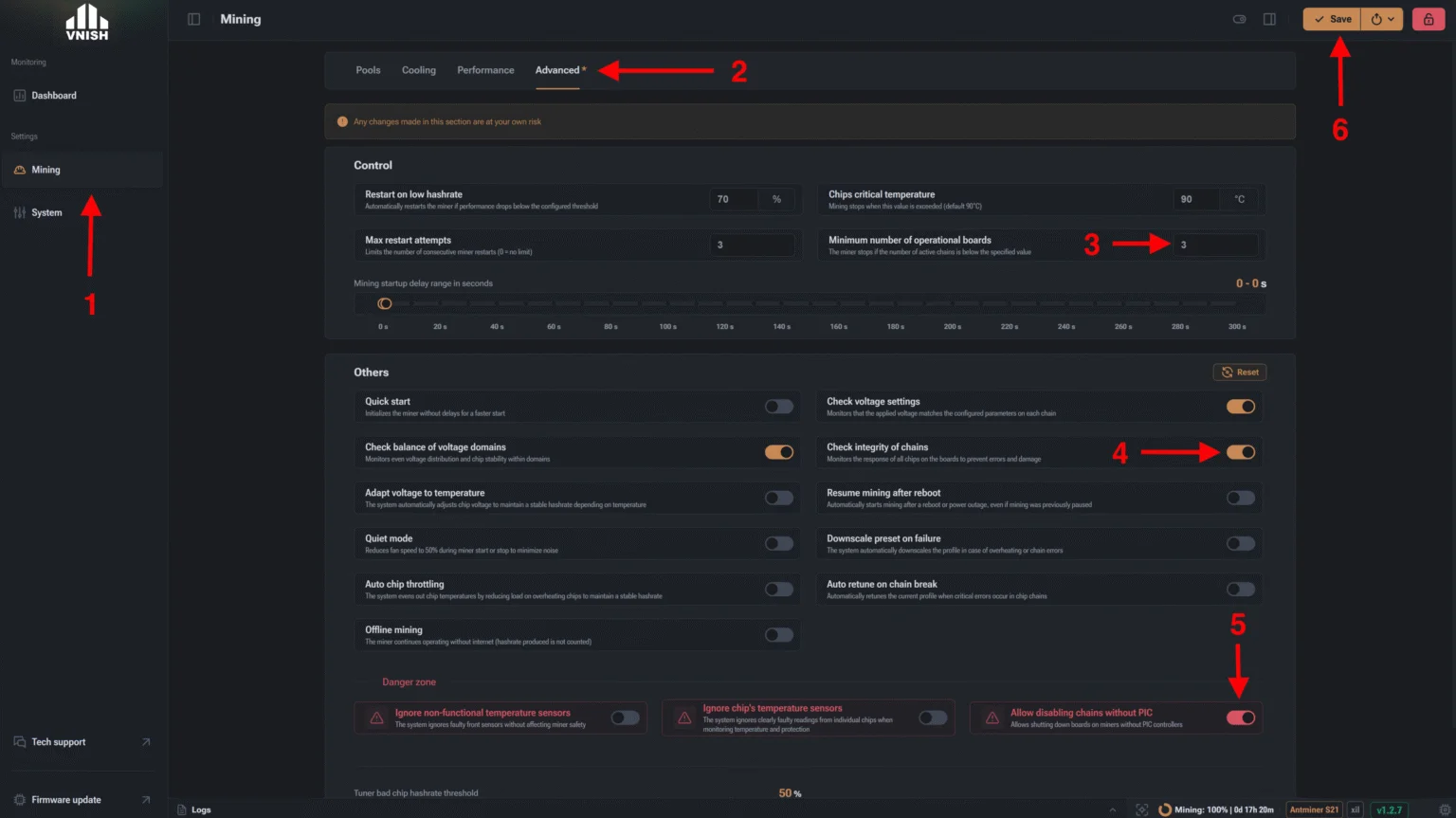
Location of the parameters in the VNISH firmware interface
🛠 Hardware check (if the error persists)
If the settings above are enabled but the board is still not detected:
- Try replacing the signal data cable (ribbon cable) that connects the control board to the problem hash board.
- If replacing the cable doesn’t help, the firmware settings you applied will let the miner keep running stably on the remaining healthy boards without stopping.