
How to Reset Antminer Password (Step-by-Step)
This guide explains how to reset the password and restore factory settings on Bitmain Antminer miners.
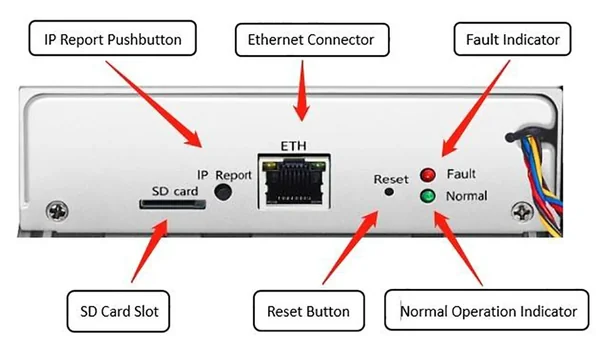
Antminer control panel
1
Reset using the Reset button
⚠️ Important: This method only works if the miner has been powered on for 2–10 minutes. If more than 10 minutes have passed since startup, the reset is usually not possible.
Steps:
- Power on the Antminer and wait at least 2 minutes.
- Press and hold the hardware Reset button on the miner for 10 seconds.
- The miner will enter reset mode and automatically reboot after 4 minutes.
- After the reboot, scan for the Antminer’s IP address again. Default login and password:
root / root
2
Reset + IP report (Hard reset)
You can also use the IP Report button located on the Antminer panel to reset the mining system.
Steps:
- First, power off the miner.
- Press and hold the hardware Reset + IP report buttons on the miner simultaneously for 10 seconds.
- The Antminer’s factory settings will be fully restored.