
Antminer L7 Vnish Firmware
Have more than 500 ASICs? Get a discount on the DEV FEE!
Select your firmware
Firmware Vnish for Bitmain
( - , )
IF SD INSTALLATION IS REQUIRED: Download the SD image (version 1.2.6!), extract it, and read the installation instructions. (For firmware installation, use an SD card with a capacity of no more than 16 GB, FAT32.) Insert the SD card with the VNISH image and power on the miner. If you remove the SD card, the BITMAIN firmware will be restored. If you need to update an already installed VNISH firmware version on the SD card or NAND, download the WEB version of the VNISH firmware and upload it using the UPGRADE function.
After rebooting a miner with a CVitek control board running VNISH firmware, the stock firmware will be restored. To prevent this, Hashcore Toolkit must be running and connected to the miner network so that VNISH remains active after rebooting or powering off.
Standard control board types: Xilinx – (SD slot on the outside), Beagle Bone BB version – (SD slot is located inside the control board), Amlogic – (only a micro USB slot is located on the outside), CVitek – (SD slot on the outside). See the file: Control Board Types
Modes antminer L7 firmware
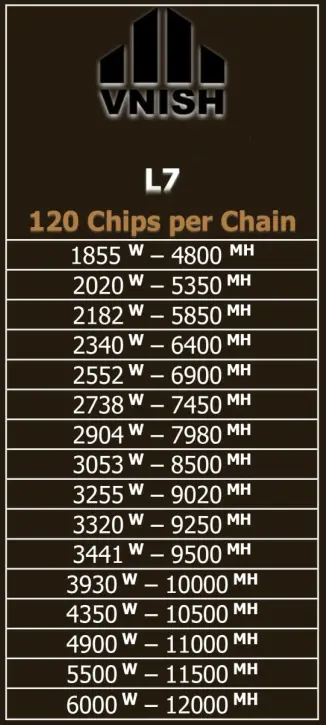
STOCK BITMAIN FIRMWARE L7
9050 TH/s – 3260 watt (0,36 watt – Mh/s)
Vnish Firmware Versions
Version 1.3.7
⌨️ We're pleased to announce the release of firmware v1.3.7, expanding our hardware ecosystem beyond the SHA-256 and Scrypt algorithms! In this release, we officially add support for the Antminer Z15 Pro (Equihash / ZEC algorithm).
⚙️ Key features for the Z15 Pro:
Manual frequency and voltage tuning: Get precise, detailed control over your hash boards with manual frequency and voltage adjustment, available right after installation.
Important note: To install or update the firmware on your hardware, make sure you are using Hashcore Toolkit version v1.7.5 or higher.
Version 1.3.6
⚙️ This one's a big deal for CV board users
Automatic Startup on CVitek Control Boards: Enjoy full, seamless automation on CVitek (CV) control boards without needing utilities like Hashcore Toolkit or Phoenix service. The firmware automatically initializes and persists across all reboots.
🔧 Bug Fixes & Refinements
CV Control Board Cleanup: Fixed the log cleanup routine when uninstalling firmware on CVitek (CV) control boards.
Version 1.2.6
🆕 Extended miner support
- New supported Antminer models:
- T19 Pro Hydro, S19j XP, S19e XP Hydro, S19 Pro Hydro (120 chips)
- S21 XP, S21+, S21+ Hydro, S21 Immersion, S21 Pro,
- S21 XP Hydro, S21 XP Immersion, T21 with Xilinx and L9
- Added Antminer submodel support for:
- S19 XP: BHB56802
- S21 Hydro: HHB68601, HHB68502, HHB68503
- T21: BHB68701-
- S21: BHB68606, BHB68603P, BHB68603-
⚙️ New features and improvements
- Added the ability to edit configured presets
- Chinese language is now available in the dashboard
- New detailed power consumption chart
- Displays miner and hashboard power consumption from presets (for models without a built-in wattmeter in the power supply)
- Water temperature widget for Antminer S19 Pro Hydro and S19 Pro Plus Hydro (inlet/outlet)
- Miner initialization: fast pause during initialization
- Power supply temperature monitoring support
- Automatic preset reconfiguration after repeated “Chain break detected” errors
- Comprehensive error system with detailed error codes
- Updated voltage limits for Antminer T21
- Automatic shutdown on any chain error for models without PIC controllers
- Charts are now saved after reboot
- Fixed unexpected miner crash
🔧 New configuration options
- Preset switching options:
- Ignore fan speed and automatic upper preset downgrade based on temperature
- Chip regulation: available for x21 series (except S21 Pro)
- Sensor handling:
- Ability to ignore chip temperature sensors (Antminer L9, Antminer S21, Antminer T21, Antminer S21 Imm, Antminer S21 Hydro)
- Ability to skip broken temperature sensors
- Startup control:
- Configurable delay before mining starts (reduces power spikes at startup)
- Configurable minimum number of working hashboards required to start mining
🔧 Bug fixes
- Fixed random EEPROM corruption
- Fixed pool configuration loss during abrupt power-off
- Fixed dashboard freeze caused by error handling
- Fixed unexpected reset of immersion mode to automatic
⚠️ Removed features
- Hotel Pool and Fees tabs removed
🌡 Preset and temperature control improvements
- Updated preset switch thresholds: RISE at 85 °C and DECREASE at 90 °C
- Added new presets for: Antminer S19j Pro+, S19a, S19 XP, S21
- Fixed presets for: Antminer S19e XP Hydro, S19 (76 chips), S19j Pro, S19 Pro+ Hydro, L7 and S19i
🌬 Fan and cooling improvements
- Added maximum fan speed limit for automatic mode
- Reduced minimum fan speed during pause to 0%
- Increased maximum fan speed to 90% when increasing presets
- Improved fan control logic based on temperature
⚙️ System configuration and behavior
- Restart configurations: maximum restart attempts are now disabled by default (0)
- Time zone:
- Added time zone handling for Cvitek
- Full reboot is now required when changing the time zone
- EEPROM reading: accelerated on all boards except XIL
- Default support: for miners without EEPROM, a default board model is assigned
- Logging:
- Logs are not preserved after reboot on Cvitek boards
- Chip ID is displayed in logs during overheat events
🌍 User experience (UX) and interface improvements
- The dashboard now automatically detects the system/browser language on first launch
- Various UI and UX improvements to enhance usability