
Frequently asked questions about Vnish firmware
1. INTRODUCTION
ASIC mining firmware refers the software installed on the miner control board. The firmware acts as a bridge between the hardware components of the miner and the blockchain, enabling the ASIC miner to efficiently perform its task in a mining pool. Firmware controls the operation of ASIC mining. It is resonsible for configuring the hardware, managing mining pools, and communicating with the blockchain network.
As a rule, firmware for ASIC miners is developed by manufacturers themselves, such as Bitmain (Antminer), MicroBT (Whatsminer) and others, who provide unique firmware for their devices. These firmwares are usually suitable for certain miner models and algorithms.
There are also independent development teams such as VNISH, who create alternative firmware for miners in order to improve their performance, stability and functionality. This firmware may be more flexible and include additional settings.
For safe and efficient mining, it is important to download Vnish firmware only from official sites. Using unofficial sources can lead to installing firmware with hidden fees, which will negatively affect your income. We guarantee no hidden fees only on our official websites:
- vnish.group – This is the main Vnish website, providing information about the company, its services and the latest news.
- vnish.us – American version of the site, aimed at users from the USA.
- vnish.cn – Chinese version of the site intended for users from China.
- vnish.es – Spanish version of the site for Spanish-speaking users.
Protect your investments and income by using only trusted sources.
2. COMMON QUESTIONS
2.1. What is ASIC mining firmware?
The ASIC mining firmware contains low-level instructions that govern the interaction of the miner’s hardware components. Additionally, the firmware handles the miner’s communication with pools through various data exchange protocols and monitors the mining process in specialized programs using built-in API functions. Provides advanced security options and virus protection.
2.2. How does ASIC mining firmware work?
ASIC mining firmware is tailored to the specific hardware configuration of the ASIC miner and the cryptocurrency algorithm it is designed to mine. It includes instructions for managing various aspects of the hardware, such as regulating voltage, controlling clock speeds, managing thermal conditions, and coordinating communication with mining pools and blockchain networks.
2.3. What are the benefits of Vnish ASIC mining firmware?
By using the Vnish ASIC mining firmware, miners can optimize the performance of their hardware and improve the efficiency of their mining operations. This can result in higher mining profits and a more stable mining experience.
2.4. Can I customize my Vnish ASIC mining firmware?
Yes, Vnish ASIC mining firmware is highly customizable. Miners can adjust a wide range of settings, such as clock speed, voltage, and fan speed, to optimize performance and efficiency. New generation of firmware contain presets for varios combination of mining process.
2.5 Where can I find latest actuall Vnish ASIC mining firmware?
All available actuall Vnish firmware can be downloaded from the official website of the developers or the websites of their partners. Link to the firmware download section on the official website of the developers.
2.6. How do I install or update Vnish ASIC mining firmware?
The installation process for ASIC mining firmware varies depending on the specific firmware being used. Generally, it involves downloading the firmware file, flashing it onto the hardware, and configuring the firmware settings. More detailed information you can find onto instalation guide page.
2.7. How and how often should you update your Vnish ASIC mining firmware?
In general, it is recommended to update your ASIC mining firmware every few months to ensure optimal performance and security. However, it’s important to carefully review the release notes and any potential risks before performing an update.
For the convenience of users already using our firmware Vnish, we have developed the Vnish Online Updater (VOU) tool. It allows you to quickly update your firmware to the latest version as soon as new releases are available, without downloading any additional files. Once VOU is installed, you no longer need to manually download update files — just click one button to update your miner’s firmware.
2.8. What happens if something goes wrong during the Vnish firmware update process?
Firmware developers makes install process safety. If something goes wrong during the firmware update process, nothing can result in hardware damage, data loss, or other issues. It is important to carefully review the instructions and follow them exactly to quick succes setup. If an issue does occur, it may be necessary to contact Vnish customer support or seek assistance from the Vnish firmware community.
2.9. Can I downgrade my Vnish ASIC mining firmware?
In general, it is not recommended to downgrade ASIC mining firmware, as this can introduce compatibility issues or other problems. However, if you do need to downgrade, it is important to carefully review the release notes and instructions to ensure that the process is done correctly. Additionally, it is recommended to back up any critical data before performing a firmware downgrade in case something goes wrong.
2.10. Can I rollback from Vnish to stock firmware, is it difficult process?
In the majority of third-party mining firmware, the process of rolling back to the stock version is very difficult. And it often requires the intervention of specialists with a high level of understanding of the software and hardware of ASIC miners.
The Vnish firmware has the ability to return to the stock version of the firmware with one click directly from the miner menu in the backup and restore section there is a button to return to stock. 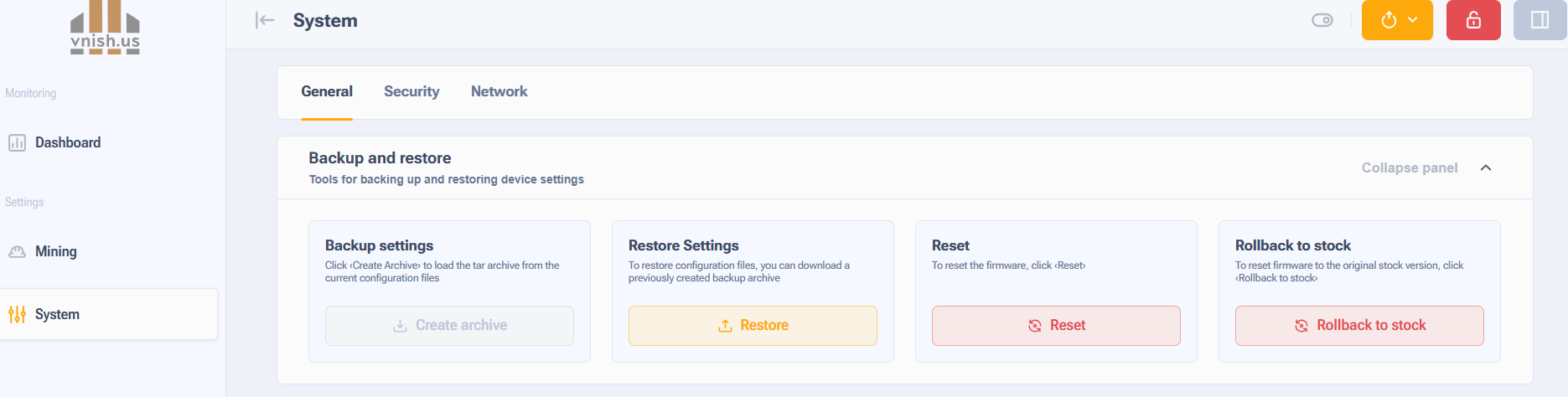
The service life of the equipment when using the VNish firmware is not reduced; it is affected by operating conditions such as temperature, power supply stability and timely maintenance. The warranty is preserved, since when returning to the standard firmware, there are no traces of Vnish left.
You can also use this guide to revert to the stock firmware — Instructions for installing stock firmware using recovery SD images.
2.11. How changes a security options of ASIC miner after install Vnish firmware?
After updating ASIC mining to Vnish firmware – security level is up. Several additioanal options realised, such as the firmware controls the SSH protocol operation, advanced virus protection of the mining hardware. The potential security risks after installing Vnish firmware, are much lower compared to the stock firmware version. All this features positive impact the security minings process.
2.12. How can I check downloaded Vnish firmware image is not damaged?
You can check is the MD5 control sum of firmware image, must be same as on each file on web site.
2.13. Can I become a Vnish partner? How does the referral program work?
Yes, you can become a partner and a member of the referral program.
Send us the following information:
Your login from Viabtc or your pool’s stratum.
List of models and types.
Percentage you want to take from the total hashrate.
For more information please write to us in Telegram
3. SPECIAL QUESTIONS
3.1. What does the name of the firmware file mean, what information is contained in the file name?
For example take two file names:
- vnish-s19-126-aml-nand-v1.2.0-beta11-update.tar.gz
- asicto-s19jpro-plus-bb-sd-v1.2.0-rc4-install.tar.gz
– brand or partner name:
“vnish” – the brand name of the firmware developer, downloaded from vnish.group.
“asicto” – the name of the partner from where the firmware was downloaded.
– miner model:
“s19jpro-plus” – Antminer S19jpro plus.
“s19-126” – Antminer S19, 126 chips per hashboard modification.
-type of control board:
Total avaible four type of conttrol boards on Bitmain Antminer equipment:
“aml” – control board based on Amlogic processor (without SD card)
“bb” – Beagle Bone double-level control board (SD card slot can be found inside )
“xil” – control board based on Zylinx processor (with SD card)
“cvc” – control board based on CVITEK processor (with SD card) – support now in devoloping.
-instalation and using methods:
“sd” – installation method type, based on SD card (available for all users)
“nand” – a way to install a control board in NAND memory directly, without SD card. Requires special software. The option is available for large farm operators.
-firmware version:
“v1.2.0-rc4” – firmware version 1.2.0. Release Candidate 4.
“v1.2.0-beta11” – firmware version 1.2.0. Beta 11.
– file type:
“install” – firmware file for initial installation ”update” – firmware file to update an already installed, for example from version 1.2.0-beta11 to 1.2.0-rc4
3.2. How to choose the Vnish firmware suitable for my mining equipment?
Before select firmware please check your miner equipment specification. Model and type of control board. This information can be found on device label attached to cover and case. Than you must go to web page https://vnish.group/en/vnish-firmware/.
3.3 What is DevFee and how does it work?
After installing and starting to use the Vnish firmware, the commission from the total hashrate in the amount of 1.8-2.8% is redirected to the developer pool, depending on the affiliate scheme. How to become a partner and make a profit together with the Vnish team, you can read and apply here.
3.31 Hotelfee Function
At the moment, the Vnish Hotel fee function is cut from the functionality of the Vnish firmware, but we can build an analogue for you – a personal version of the Vnish firmware with the inclusion of your pool, worker and percentage.
Terms of the personal Vnish firmware.
3.32 Vnish without Devfee
The official Vnish firmware always includes a standard devfee 2.8% fee, and any offers of a “free” version without the fee are obviously false. Using such dubious firmware can lead to hidden devfee (where the fee is higher, but remains invisible to the user), decreased performance, or even complete failure of the equipment.
To protect yourself, download the firmware only from official sources: official Vnish website. If you need a partner version of the firmware, contact official Vnish telegram channel. Don’t risk your equipment and profits, trust only proven resources!
After installing and starting to use the Vnish firmware, a commission from the total hashrate of 1.8-2.8% is redirected to the developer pool, depending on the affiliate scheme. How to become a partner and make a profit with the Vnish team, you can read and apply here.
3.4. What is Autotune and how it works?
AUTOTUNE, like OVERCLOCK, includes voltage and frequency settings regulation, but individually. The Vnish firmware finds the optimal frequency for each individual chip by sending higher frequencies to higher quality chips or lower frequencies to lower quality chips.
3.5. How can I get maximum hashrate with Vnish firmware?
Vnish firmware implements the ability to manually adjust the voltage and frequency on the miner hash-boards. There are also tested equipment operation profiles. Among which there are profiles of maximum loads for miners with air and liquid cooling. And also with a stock or modified power supply. You can read more about modifying the power supply here.
3.6. How can I reduce power consumption with the Vnish firmware?
Same as to increase the hashrate and to reduce power consumption in Vnish firmware, you can use the manual control mode and preset profiles. Among which there are modes with optimal and reduced power consumption. A table with reference data on hashrate and consumption for each miner model is available at the link
3.7. How long time takes Autotune process, is any indication when it finish?
Typically, the setup process takes up to 3-4 hours. Runs without additional hardware reboots. The process is accompanied by an indication in the status bar and in the browser favicon. After Autotune is completed, the selected profile is marked as tuned.
3.8. VNISH operating modes for series 21, 19, L9, L7
The VNISH firmware already includes ready-to-use and thoroughly tested optimal profiles for every miner model. They are balanced in terms of hashrate-to-power-consumption ratio, allowing you to quickly select the most suitable operating mode.
Depending on the situation, the user can choose:
- balanced mode — when the priority is maximum stability and long-term equipment operation;
- energy-efficient profile — with the lowest W/TH value in regions with high electricity prices;
- maximum performance profile — when the highest computing power is needed in the short term.
The settings take into account ambient air temperature, cooling/ventilation efficiency, power supply parameters, and even the degree of wear on individual miner components. This makes it possible to adapt the equipment to real-world conditions without unnecessary risks or complicated manual tuning.
3.9. Where can I view the API documentation?
You can view the documentation in the firmware itself by opening http://miner_IPaddress/docs/ in the address bar or use this link.
4. Vnish dev fee offline
To fix the DevFee offline error, you need to update the firmware to the latest version.
Download VOU (Updater software) and update your miners to the latest version automatically:
For Windows:
https://vnish.us/files/tools/vou_win.zip
For Android:
https://vnish.us/files/tools/vou_android.apk
For macOS:
https://vnish.us/files/tools/vou_mac.zip
Link to all firmware:
https://vnish.group/en/vnish-firmware/
IF YOU STILL HAVE A PROBLEM AFTER THE UPDATE:
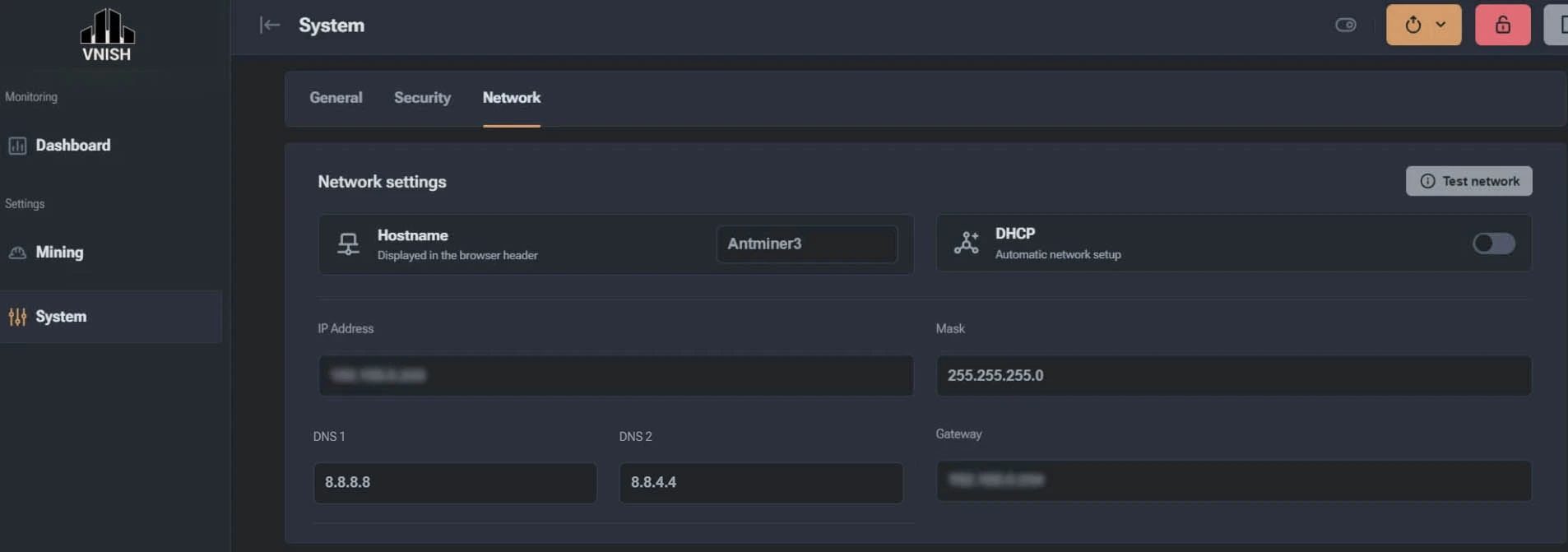
Install Google DNS on your miner.
To install and change the miner’s DNS,
In the left menu:
System -> Network -> Disable DHCP.
DNS 1 : 8.8.8.8
DNS 2 : 8.8.4.4
Save and reboot
4.1 Vnish default password
Unlock access to the ASIC when prompted for the default Vnish password, enter – admin
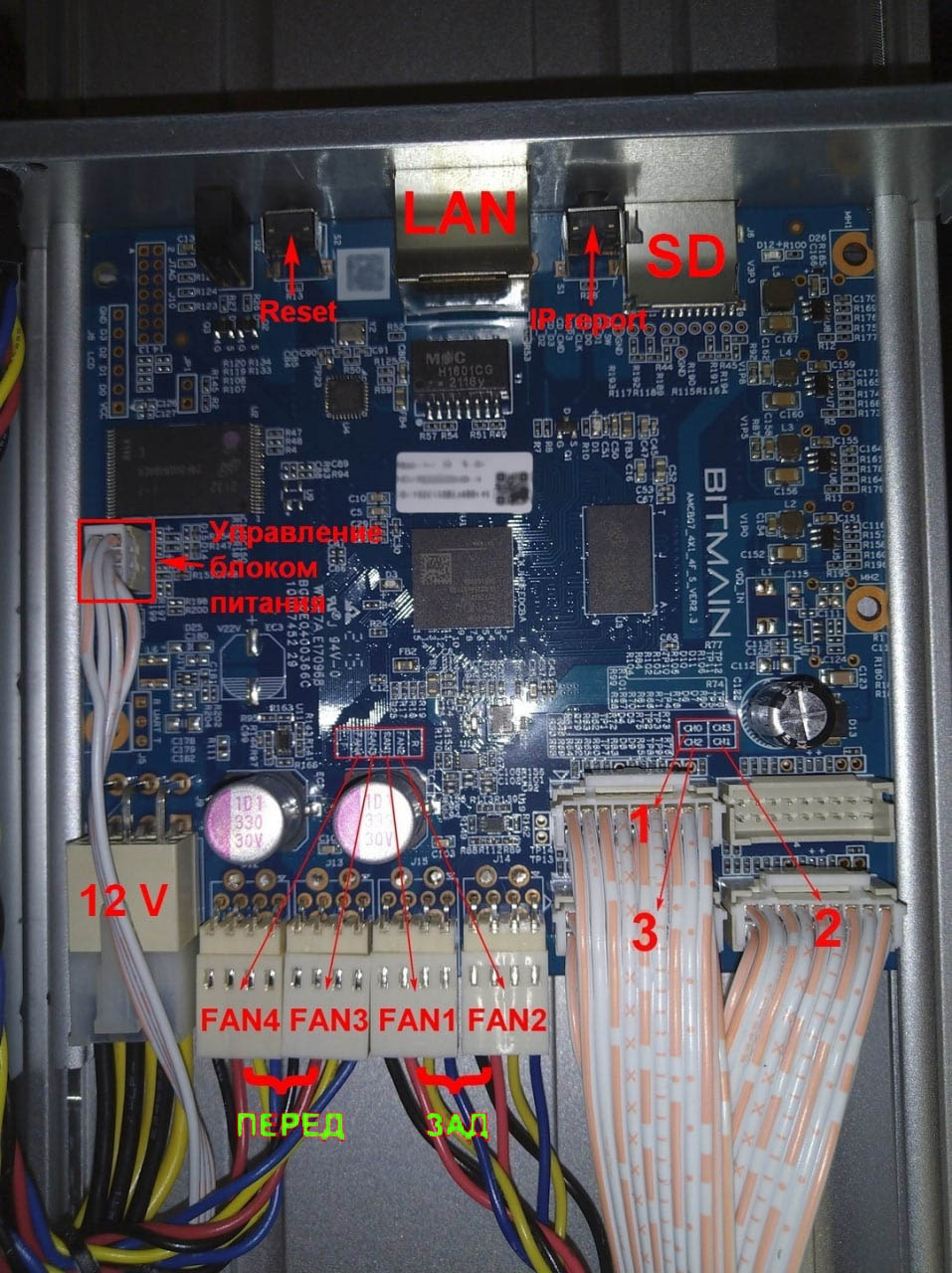
4.2 Fans (coolers) tooktit connection correspondence diagram
Cooler connection correspondence diagram in the vnish toolkit interface
4.3 Vinsh auto profile switching function
– What Is It?
The auto-profile switching feature automatically adjusts your mining equipment’s settings based on current cooling conditions. This ensures optimal performance and stability while reducing the need for manual intervention.
The auto-profile switching function streamlines the operation of mining equipment, promoting stability and efficiency. By tailoring settings for each model and setting an upper profile limit, you gain better control over performance while protecting your hardware.
– How It Works
The system monitors the equipment’s temperature and automatically switches between hash rate profiles to prevent overheating. You can define a range that sets both the minimum and maximum limits, beyond which the device will not operate.
– Key Benefits
- Enhanced performance
- Lower power consumption
- Increased equipment lifespan
By maintaining consistent operating temperatures, this function helps prevent overheating and reduces component wear.
– Setup Instructions
Step 1: Enable the Feature
- Open the equipment settings menu
- Navigate to the Performance tab
- Activate the Auto-profile switching option
Step 2: Select Your Profiles
Configure the default (starting) profile. This will also serve as the fallback in case of rising temperatures. In critical situations, performance may drop below this level.
Step 3: Set the Upper Limit
Choose the maximum profile level that the system should not exceed. This prevents overloading and maintains stable operation.
– Recommended Settings by Model
S21/T21
- Target Temp: 70 °C
- Critical Temp: 85 °C
- Min Fan Speed: 10%
- Profile Boost: 71 °C
- Profile Down: 76 °C
S19 (76 and 114 chips)
- Target Temp: 75 °C
- Critical Temp: 87 °C
- Min Fan Speed: 10%
- Profile Boost: 76 °C
- Profile Down: 81 °C
S19 (77, 88, 110, 120, 126 chips)
- Target Temp: 67 °C
- Critical Temp: 82 °C
- Min Fan Speed: 10%
- Profile Boost: 68 °C
- Profile Down: 73 °C
L9/L7
- Target Temp: 73 °C
- Critical Temp: 88 °C
- Min Fan Speed: 10%
- Profile Boost: 74 °C
- Profile Down: 79 °C
ASIC Hydro (Factory Configuration)
- Target Board Temp: Up to 65 °C
- Profile Boost: 67 °C
- Profile Down: 72 °C
– Recommendations
- Regular Monitoring: Periodically review and adjust profile settings to match current operating conditions and performance goals.
- Effective Cooling: Ensure your cooling systems are functioning properly to prevent thermal stress on the hardware.
4.4 If one of the ASIC boards is not working
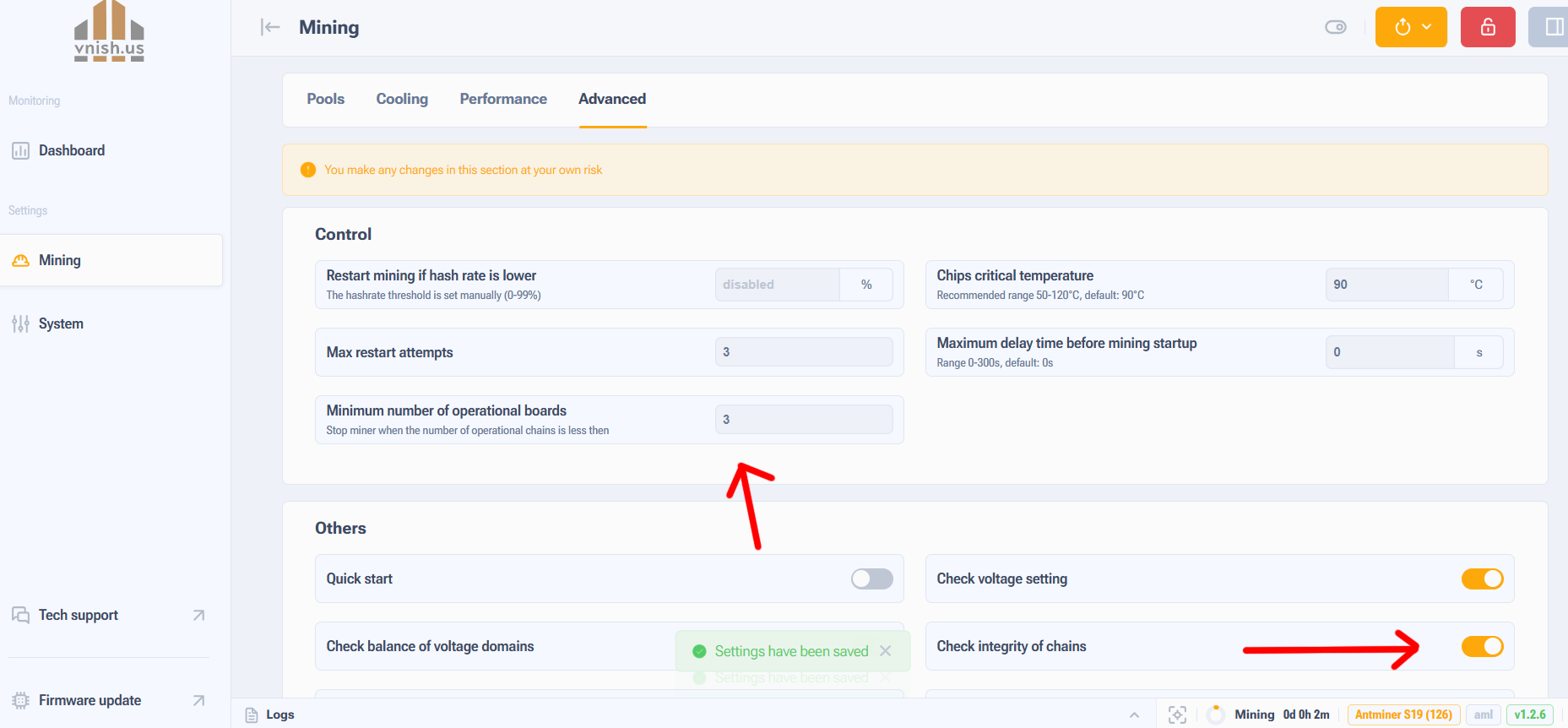
It is necessary to:
- Disable the board in the
advanced settingssection. - Set the working number of chains in
advanced settings. - Disconnect the ribbon cable from the board, preferably place a dielectric spacer between the bus and the board (isolate it).
- Replace the ribbon cable on the faulty board — if this does not help, send it for repair.
4.5 SUPPORTED BITMAIN ANTMINER MODELS
VNISH firmware is compatible with the most widely used Bitmain Antminer devices.
Examples:
Antminer S21 is widely regarded as the most power-efficient miner of its generation. It already demonstrates excellent efficiency with factory settings, but VNISH allows miners to further cut electricity costs or increase hashrate depending on operational goals and site conditions.
Antminer S19, the entry model in the S19 lineup, is built on 7 nm chips. While it is stable in stock mode, its power consumption is relatively high. With VNISH firmware, users can either significantly improve energy efficiency or push the device for higher performance through overclocking.
Antminer S19j Pro provides a better balance between hashrate and power usage compared to the base S19. VNISH improves overall stability and gives flexibility to either achieve a noticeable performance boost or reduce power consumption in efficiency-focused modes.
Antminer S19XP uses advanced 5 nm chips that already offer strong efficiency out of the box. After tuning with VNISH, this miner can reach even lower power consumption or unlock higher hashrate levels when overclocked.
VNISH also supports other models such as Antminer L7 and L9, which run on the Scrypt algorithm. In these cases, optimization is equally impactful—users can typically reduce power usage by 10–15% or gain additional megahashes.
Optimization Impact by Chip Class
- 5 nm chips (S21, S19XP): enhanced stability and fine-grained tuning allow for deeper and more precise optimization.
- 7 nm chips (S19): optimization is mainly focused on lowering watts per terahash (W/TH).
- Scrypt models (L7, L9): thermal management plays a crucial role, as these miners produce significantly more heat.
4.6 VNISH INTERFACE
The VNISH firmware provides a convenient and intuitive miner management system. Users can monitor performance in real time and save event logs, reducing the need for constant physical presence near the equipment and enabling efficient remote farm management.
This is especially relevant for large-scale mining facilities where dozens or even hundreds of devices operate simultaneously. At this scale, software automation reduces risks and minimizes the impact of human error on the stability and uninterrupted operation of the equipment.
4.7 Auto-Tuning
Upon first launch, VNISH performs automatic chip tuning. This means the firmware tests each chip, determines its stable frequency and voltage range, and creates an optimal profile. The same process also occurs after applying a new overclocking profile.
At the same time, a fan curve is generated — defining the relationship between fan speed and temperature. As a result, the miner operates stably from the start, without overheating or excessive noise.
Autotuning can take up to 6 hours.